
Last updated on
Nov 6, 2026

OPM SF 813 2013-2026 free printable template
pdfFiller is not affiliated with any government organization

Fill out
Complete the form online in a simple drag-and-drop editor.

eSign
Add your legally binding signature or send the form for signing.

Share
Share the form via a link, letting anyone fill it out from any device.

Export
Download, print, email, or move the form to your cloud storage.
Why pdfFiller is the best tool for your documents and forms


End-to-end document management
From editing and signing to collaboration and tracking, pdfFiller has everything you need to get your documents done quickly and efficiently.
Accessible from anywhere
pdfFiller is fully cloud-based. This means you can edit, sign, and share documents from anywhere using your computer, smartphone, or tablet.
Secure and compliant
pdfFiller lets you securely manage documents following global laws like ESIGN, CCPA, and GDPR. It's also HIPAA and SOC 2 compliant.
What is OPM SF 813
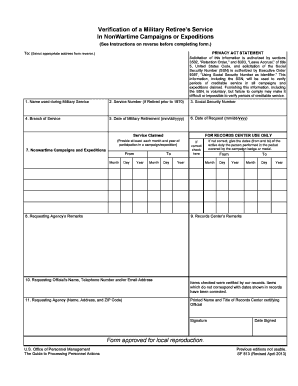
The Verification of Military Retiree Service is a government form used by military retirees to confirm their service periods in nonwartime campaigns or expeditions.
pdfFiller scores top ratings on review platforms




PDFFiller is a great tool! I have been very happy being able to fill in documents without having to print the document, then handwrite the answers on the document, so I could then scan it back in to my computer to send it off via email.
Just starting but it looks like something I need.
i am just starting a new company and your service has been essential in that i have a way to edit our flyers our price list and being able to add things for the customer like check boxes and signature lines has been a god send thank you
so far it has been positive. I had one issue that your customer care specialist was able to resolve very quickly.
i love this program is has helped me tremendously. i just haven't mastered all the features yet need some help
Great website!!
So far I love this service! Only had some tech issues yesterday and they were addressed quick by your tech support. I love the layout, it's very easy to navigate, and the editing options on the top bar also make it super easy to check, sign, and type just about anywhere in the document. I love it!
Who needs OPM SF 813?
Explore how professionals across industries use pdfFiller.

OPM SF 813 is needed by:
-
Military retirees seeking verification of service
-
Requesting officials processing retiree benefits
-
Records center certifying officials needing documentation
-
Veterans Affairs employees managing retiree information
-
Family members assisting retirees with documentation
Comprehensive Guide to OPM SF 813
What is the Verification of Military Retiree Service?
The Verification of Military Retiree Service is facilitated through the SF 813 form, primarily used by military retirees to validate their service periods. This form specifically verifies nonwartime campaigns and expeditions, ensuring that retirees have documented their necessary military service. Accurate verification is crucial for accessing various benefits or documentation related to military service.
Purpose and Benefits of Military Retiree Service Verification
The primary purpose of the military retiree service verification is to provide essential documentation for veterans. By utilizing the SF 813 form, retirees can establish eligibility for VA benefits and access other military advantages. Additionally, this verification process simplifies the journey for retirees when applying for personal records or other associated applications. With structured service verification, navigating veterans' services becomes more efficient.
Who Needs the Verification of Military Retiree Service?
The verification process primarily serves military retirees seeking acknowledgment of their service. Eligible individuals include those who have formally retired from military service and require this documentation for various applications. Involved roles such as Requesting Officials and Records Center Certifying Officials play crucial parts in the verification process. This verification is often necessary when applying for specific benefits, ensuring that relevant records are in order.
How to Fill Out the Verification of Military Retiree Service Online
To effectively complete the SF 813 form online, follow these essential steps:
-
Gather required information, including your name, service number, and social security number.
-
Access the online form on the appropriate platform.
-
Carefully fill out each field, ensuring information is accurate and complete.
-
Review all entries before submission to maintain compliance with necessary standards.
Ensuring each detail is correct prevents unnecessary delays in the verification process.
Common Mistakes and How to Avoid Them
When filling out the SF 813 form, several common mistakes can occur. Frequently noted pitfalls include:
-
Entering incorrect dates related to service.
-
Leaving required fields blank, such as signatures.
-
Miswriting the service number or social security number.
To avoid these errors, double-check all information and seek clarity on any field requirements. This attention to detail will ensure your submission is complete and accurate.
How to Submit the Verification of Military Retiree Service
Once the SF 813 form is completed, submission can occur through various methods:
-
Mail the completed form to the designated address for your branch of service.
-
Choose electronic submission if available to expedite the process.
It is advisable to track your submission and confirm delivery to ensure your form is processed timely.
What Happens After You Submit the Verification of Military Retiree Service?
After submission of the SF 813 form, several steps follow:
-
Processing timelines can vary, so be prepared for possible waits.
-
Track the status of your submission through the provided channels.
-
If additional information is requested, respond promptly to avoid delays.
Being proactive during this stage helps maintain clarity in the verification process.
Security and Compliance When Using the Verification of Military Retiree Service Form
Ensuring document safety is a priority throughout the verification process. The SF 813 form adheres to strict data protection measures:
-
All information is handled under 256-bit encryption protocols.
-
The process complies with regulations such as HIPAA and GDPR.
Protecting sensitive personal information is paramount when verifying military service, allowing individuals to submit forms with confidence in their security.
Utilizing pdfFiller for Your Verification of Military Retiree Service Form
Using pdfFiller enhances the experience of completing the SF 813 form thanks to its user-friendly features. Users can:
-
Edit text and images seamlessly within the form.
-
Utilize eSigning capabilities for added convenience.
-
Access the form from any device, managing submissions efficiently with cloud-based tools.
Leveraging these advantages ensures a smoother process for filling and submitting military retiree service verification forms.
How to fill out the OPM SF 813
-
1.To access the Verification of Military Retiree Service form, visit pdfFiller's website and search for 'Verification of Military Retiree Service' or use the provided link if available.
-
2.Once opened, use pdfFiller's intuitive interface to navigate the form. Click on editable fields to enter information directly into the form.
-
3.Before beginning, gather all required information, including the retiree's name, service number, social security number, branch of service, and dates of military retirement to streamline the process.
-
4.Carefully fill in each section of the form, using the instructional prompts and checkboxes as guidelines. Thoroughly complete all mandatory fields to avoid delays.
-
5.Review the form after filling it out for any errors or missing information. PDFfiller allows you to edit any sections easily before finalization.
-
6.Once satisfied with the completed form, you can save it within your pdfFiller account, download it in your preferred format, or submit it electronically according to the instructions provided on the form.

Who is eligible to complete the Verification of Military Retiree Service form?
The form is intended for military retirees who need to verify their service in nonwartime campaigns or expeditions. Retirees should have their service details ready to accurately complete the form.
What should I include with the form when submitting?
You often must include relevant supporting documentation, such as the retiree's service records and identification. Always check the specific requirements for your branch of service.
How can I submit the completed form?
You can submit the Verification of Military Retiree Service form electronically through pdfFiller or print it out and mail it to the addresses provided based on military branch guidelines.
Are there any common mistakes to avoid when filling out the form?
Common mistakes include leaving mandatory fields blank, incorrect information, or failing to sign the form if required. Ensure every required portion is addressed fully.
What is the processing time for the Verification of Military Retiree Service form?
Processing times may vary depending on the branch of service. Allow several weeks for processing, especially during peak submission times. Check with the relevant records center for specific estimates.
Do I need to have the form notarized?
No, notarization is not required for the Verification of Military Retiree Service form. However, ensure it is signed where needed by the appropriate authorities.
What if I have errors in my completed form?
If you find errors after submission, contact the records center or relevant authority immediately to know the process for correction. They can guide you on how to amend your submitted information.
OPM SF 813 Form Versions
Related Content
Related Forms



Get the latest insights from our blog


If you believe that this page should be taken down, please follow our DMCA take down process
here
.
This form may include fields for payment information. Data entered in these fields is not covered by PCI DSS compliance.